



Preloader Logo
ANA Digital Media Logo
Breadcrumb Elements 1 Breadcrumb Elements 2

What is JavaScript SEO? Explanation, Examples and Best Practices for Better Indexation

Home What is JavaScript SEO? Explanation, Examples and Best Practices for Better Indexation
What Is JavaScript SEO? Complete Guide

I hope you enjoy reading this article. If you need support with SEO , Google Ads , Facebook Ads, or Landing Pages, click on the link.

More and more websites are running on JavaScript frameworks such as React, Vue, or Angular. This makes them fast, dynamic, and user-friendly — but also more difficult for search engines to understand. JavaScript SEO focuses on making that dynamic content visible to Google, so that your pages are fully indexed and correctly displayed in the search results.

In this article, you will discover step by step how JavaScript SEO works, which mistakes are commonly made and how to avoid them. You will learn how Google handles the rendering of JavaScript, how to test whether your site is being indexed correctly, and which technical solutions — such as server-side rendering or prerendering — truly make a difference. This way, you will know exactly how to make your website future-proof for search engines and AI-driven search results.

How JavaScript SEO Works Technically

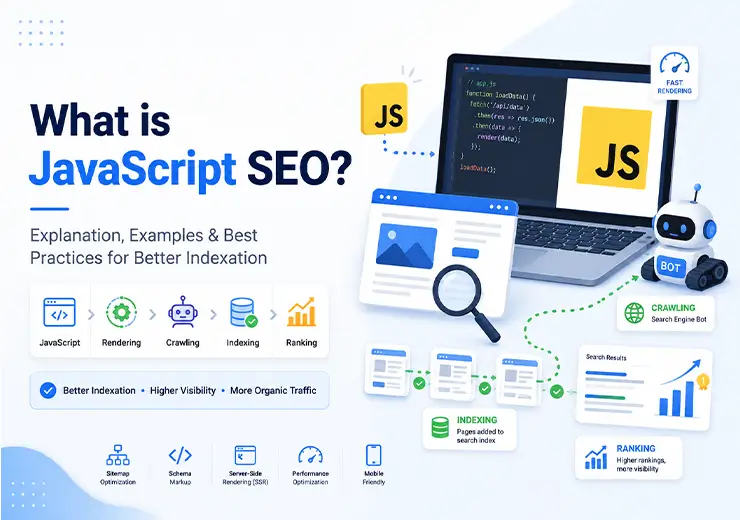
JavaScript SEO is an important component of technical search engine optimisation that focuses on making websites that use JavaScript more findable. To achieve this, search engines such as Google must be able to crawl, render, and index your JavaScript content. This process takes place in three phases: crawling, rendering, and indexing.

With traditional HTML websites, Googlebot receives the complete HTML directly, meaning all texts, links, and metadata are immediately visible in the initial HTML response. This makes it straightforward for search engines to understand and index the page.

However, with websites that use JavaScript frameworks such as React, Vue, or Angular, the content often only becomes visible after the browser has executed the JavaScript code. This is called client-side rendering (CSR). As a result, Googlebot initially only sees the unrendered HTML, without the actual content. Only during the rendering process is the JavaScript executed and the rendered HTML made visible.

In concrete terms, this means: if your most important content only becomes visible after JavaScript has been executed, search engines may not be able to find and index that content directly. This can lead to lower visibility in the search results and missed opportunities.

You can easily test whether your page is being rendered client-side by looking at the page source via "View Page Source" versus "Inspect Element." If you cannot see the expected content in the page source (the HTML), but you can see it in Inspect Element (the Document Object Model, or DOM), then the page is being loaded client-side.

To ensure that search engines can properly crawl and index your page, there are three commonly used techniques to make content available in the initial HTML response:

Server-side rendering (SSR): Here, the complete HTML of the page is generated on the server and delivered directly to Googlebot and users. This ensures that the content is immediately visible in the initial HTML and speeds up indexation. Frameworks such as Next.js and Nuxt.js support SSR by default.

Prerendering: With this method, a static HTML version of the page is generated in advance, which is then shown to search engines. Visitors receive the dynamic JavaScript version. Tools such as Prerender.io and Rendertron are commonly used for this purpose.

Dynamic rendering: With this method, the user sees the client-side rendered version, whilst search engines automatically receive a pre-rendered HTML version. This is a temporary solution that is useful when migration to SSR or prerendering is not yet possible.

By applying one of these techniques, you ensure that search engines can crawl and index your complete content — including important texts, links, and structured data — without having to wait for JavaScript to be executed.

Tip: Use the URL Inspection tool in Google Search Console to view the tested page and examine the crawled page. This allows you to check whether Google actually sees the same content as your users.

With this approach, you improve not only findability but also the user experience, as pages load faster and display immediately usable content.

Key Takeaways

Ensure that content is directly visible in the initial HTML Google can only index quickly and completely if texts, links, and structured data are present in the first HTML response — not only after JavaScript has been executed.

Use the right rendering method for your site Server-side rendering (SSR) and prerendering are the most stable solutions. Dynamic rendering can be used temporarily but is not a sustainable approach.

Test what Google actually sees Regularly check with the URL Inspection tool, Screaming Frog with JavaScript rendering, and the Rich Results Test to verify whether the rendered HTML matches what users see.

Collaborate with developers for sustainable SEO results JavaScript SEO requires teamwork: combine technical knowledge with SEO best practices to continuously improve indexation, speed, and structured data.

What Problems Does JavaScript Cause for SEO?

Blog Img

JavaScript makes websites interactive and fast, but often causes indexation problems. Many search engines, including Google, struggle with content that only becomes visible after JavaScript has been executed. According to Google Search Central's documentation on "Rendering on the Web," Googlebot initially only sees the unrendered HTML — also known as the initial HTML response. If your most important texts, links, or structured data are only loaded afterwards via JavaScript, this can mean that Google is unable to fully crawl and index that content.

This is because Google processes JavaScript in three phases: first crawling the URL and its associated HTML, then rendering the page whereby the JavaScript is executed, and finally indexing the complete rendered content. The difference between the initial HTML response and the rendered HTML is crucial — if important content only appears in the rendered HTML, this can lead to serious SEO issues.

Here is how you recognise this in practice:

Right-click and select "View Page Source." If you cannot see product texts, headings, or category content there, your page is probably being rendered client-side, meaning the content only becomes visible after JavaScript has been executed.

Check in Google Search Console → URL Inspection whether the rendered HTML shows the same content as the live version. Click "View Tested Page" to see what Googlebot actually sees.

Use a site audit tool such as Screaming Frog with JavaScript rendering enabled to analyse which links or content only become visible after rendering. This helps you identify JavaScript SEO issues that may be hindering indexation.

Many e-commerce platforms, for example, load product information or reviews via JavaScript, meaning Google misses rich snippets or indexes product pages incompletely. Internal links that are created via JavaScript buttons or interactive forms are also not always followed by search engines.

In short: if content or structured data is not visible in the initial HTML, you risk lower visibility, missed rich results, and delayed indexation. This is because Google and other search engines can only fully interpret the Document Object Model (DOM) after JavaScript has been executed — but that rendering takes place with some delay. As a result, important elements on the page may not be seen immediately by search engines.

Why is the Initial HTML Response So Important?

The initial HTML response — that is, the HTML that the server sends back directly without JavaScript having been executed — is essential for search engines to understand a page quickly and efficiently. When content only becomes visible after JavaScript has rendered it, search engines can sometimes miss it or only index it later. This can result in your pages performing less well in the search results.

The Role of Server-Side Rendering (SSR) and Client-Side Rendering (CSR)

With server-side rendering (SSR), the complete HTML page is generated on the server and delivered directly to both users and search engines. This means the content is already present in the initial HTML response, allowing search engines to crawl and index your content immediately.

With client-side rendering (CSR), the browser or Googlebot receives a minimal HTML page, and the content only becomes visible after JavaScript has been executed in the browser. This can cause delays in the indexation process and create SEO problems.

What is the Difference Between SSR and CSR?

Server-side rendering (SSR) ensures that the page is already fully constructed in the HTML that the server returns. This means search engines can immediately see the complete content of the page without being dependent on JavaScript execution. This improves the speed of indexation and visibility in the search results.

Client-side rendering (CSR), on the other hand, loads a minimal HTML page, after which JavaScript is executed in the browser to build the page. This means search engines first have to wait for the rendering process to complete before they can see the full content. This can lead to delays and the missing of important content.

Why is it Important to Test What Search Engines See?

The reality is that Google processes JavaScript in three phases: crawling, rendering, and indexing. It is essential to check whether your content is already visible in the initial HTML response upon Googlebot's first visit, so that your findability is not hindered.

With the right testing tools, you can see exactly what Googlebot sees — namely the rendered HTML. This prevents important content from remaining invisible and ensures an optimal user experience and better positions in the search results.

The good news is that with the right approach and tools, you can fully optimise your JavaScript website for search engines — retaining the benefits of interactive and dynamic content without making any SEO compromises.

What Can You Do to Prevent JavaScript SEO Issues?

Ensure that important content — such as product texts, headings, and structured data — is already present in the initial HTML response. This can be achieved by using server-side rendering (SSR) or prerendering. In this way, search engines can crawl and index your page directly without having to wait for your JavaScript to be executed.

Use semantic HTML and add important metadata directly in the source code, not only via JavaScript. This helps search engines to better understand and appreciate the structure and relevance of the content on the page.

Avoid using JavaScript for essential navigation elements such as internal links. Use regular HTML anchor tags for these, so that search engines can easily follow them and understand the site architecture.

Test regularly with tools such as the URL Inspection tool in Google Search Console, Screaming Frog with JavaScript rendering, and the Rich Results Test to check what search engines actually see in the rendered HTML. In Google Search Console, click "View Tested Page" to see how Google renders the page and what content is visible to both users and search engines.

Work closely with developers to ensure that your JavaScript is rendered correctly and that SEO best practices are followed. Discuss, for example, whether important content and metadata are already present in the initial HTML response, so that Google does not have to wait for the Document Object Model (DOM) to be rendered.

By following these steps, you ensure that your website functions optimally for both users and search engines, and you prevent important content from remaining invisible in the search results.

The good news is that with the right approach and tools, you can fully optimise your JavaScript website for search engines, retaining the benefits of interactive and dynamic content without SEO compromises. The reality is that Google processes JavaScript in three phases — crawling, rendering, and indexing — and you want your content to already be visible in the initial HTML upon Googlebot's first visit, so that your findability is not hindered.

How Do You Resolve JavaScript SEO Problems?

Blog Img

Resolving JavaScript SEO problems starts with one goal: search engines must be able to understand your content directly, without being dependent on scripts. To achieve this, you use a rendering method that shows Googlebot the complete HTML, so that every text, link, and structured data element is read immediately.

The three most commonly used solutions in practice:

Check Icon

Server-side rendering (SSR) The server sends a complete HTML version to the browser and to Googlebot when a page is loaded. Frameworks such as Next.js or Nuxt.js support this by default. According to Semrush's guide on JavaScript SEO, SSR is the most sustainable approach because it keeps full control over the indexation of content.


Check Icon

Prerendering With this method, a static HTML copy of each page is created in advance. Visitors see the dynamic version, whilst crawlers receive the pre-rendered page. Tools such as Prerender.io or Rendertron are commonly used for this. This is particularly effective for smaller online stores or informational websites.

Check Icon

Dynamic rendering This method delivers the JavaScript version to users, whilst bots automatically receive a pre-rendered HTML version. It is a temporary solution that is useful when your site cannot yet be migrated to server-side rendering.

Check Icon

Practical tip: open your page, click "View Page Source," and check whether your product texts, headings, and structured data are visible. If they are not, your content is probably only being loaded after JavaScript is executed and optimisation is needed.

Check Icon

A well-executed rendering strategy not only speeds up indexation, but also improves load time, structured data, and the stability of your search positions.

What Are the Best Practices for JavaScript SEO in 2026?

JavaScript SEO has changed significantly in recent years. Whereas previously it was mainly about making content visible to crawlers, the focus in 2026 is on technical efficiency, user experience, and AI-friendly indexation. Search engines assess not only whether they can read the content, but also how quickly, stably, and semantically correctly it is loaded.

The Most Important Best Practices for 2026

Use semantic HTML and a clear content structure Build pages with a logical structure using elements such as "< header >, < main >, < article >, < section >, and < footer >". In addition, use a clear heading hierarchy (H1–H6) and ensure that content blocks are independently comprehensible. This helps search engines and AI systems to better understand what a page is about and which information is most important.

Ensure fast, efficient pages Core Web Vitals remain important: aim for an LCP below 2.5 seconds, an INP below 200 milliseconds, and a CLS below 0.1. Additionally, look beyond user experience alone. Optimise server performance, limit unnecessary JavaScript, and ensure that crawlers can process pages efficiently. Fast websites are better for users and for indexation alike.

Add structured data in JSON-LD Use schema markup such as Product, Article, Organization, Person, Review, and BreadcrumbList directly in the HTML via JSON-LD. Structured data helps search engines and AI systems to understand content more quickly, recognise entities, and correctly process information for search results, AI Overviews, and other generative search experiences.

Make important content directly accessible Prevent essential content from only becoming visible after user interaction or from being entirely dependent on client-side JavaScript. Where possible, opt for server-side rendering (SSR), static site generation (SSG), or a hybrid approach. This allows search engines and AI systems to discover, render, and index important information more quickly.

Write for users and AI-driven search engines Focus not only on keywords, but on clear answers, relevant topics, and a strong content structure. Answer frequently asked questions explicitly, use recognisable entities, and provide sufficient context. Content that is easy to understand performs better in both traditional search results and AI-generated answers.

Demonstrate expertise and trustworthiness Make it clear who the author or organisation behind the content is. State expertise, experience, sources, and contact information where relevant. This aligns with the E-E-A-T principles (Experience, Expertise, Authoritativeness, and Trustworthiness), which are becoming increasingly important for visibility in search engines.

Collaborate with developers A strong technical SEO result only arises when SEO specialists and developers work together. When releasing new features, discuss whether content remains properly accessible, whether important information is available without JavaScript, and whether structured data is being implemented correctly.

Test after every deployment Use tools such as the Rich Results Test, PageSpeed Insights, and Screaming Frog with JavaScript rendering to check what search engines actually see. Also test whether important content, entities, and page elements are properly accessible to both crawlers and AI systems.

In short: write for users, structure for search engines and AI systems, make important content directly accessible, use semantic HTML and structured data, and test after every update how your website is being interpreted and indexed.

How Do You Test and Validate JavaScript SEO Implementations?

Blog Img

A successful JavaScript SEO strategy stands or falls with a thorough testing phase. Many businesses make technical adjustments but forget to check whether Google is seeing the correct version of their content. By systematically testing with the right tools, you can see exactly whether your page is being rendered correctly, which elements are visible to crawlers, and where there is still room for improvement.

Here is how to test step by step whether your JavaScript SEO is working correctly:

Check Icon

Check the rendered HTML in Google Search Console Use the URL Inspection tool to check whether Google sees the complete rendered HTML of a page. Click "View Tested Page" and compare the content with what you see on the live site. This helps ensure that the JavaScript is being executed correctly and that search engines can properly process your JavaScript content.

Check Icon

Compare source code and rendered version Open your page with "View Page Source" and compare it with what you see in "Inspect Element" (the Document Object Model, or DOM). If the source code is empty but Inspect does show content, then the page is being loaded client-side with JavaScript. This is the opposite of server-side rendering, where the content is already present in the initial HTML response.

Check Icon

Use a crawler with JavaScript rendering Tools such as Screaming Frog, Sitebulb, or JetOctopus show which elements only appear after rendering. Activate JavaScript rendering and examine the differences in titles, headings, and internal links. This helps you identify JavaScript SEO problems that can arise when JavaScript content is not directly visible on the page.

Check Icon

Validate structured data and rich results Test your page with the Rich Results Test or the Schema Markup Validator to check whether your structured data is being read correctly by search engines. This is essential to ensure that rich snippets appear in the search results.

Check Icon

Monitor indexation and performance Track in Google Search Console which pages are being indexed and when. Regularly check whether new content is being picked up quickly — this is proof that your rendering method is working and that Google can see the complete content via JavaScript.

Pro tip: create a mini SEO checklist with these five steps for every update. This way, you can be certain that every change is technically sound and that your visibility is not accidentally restricted. Also do not forget to check whether any important files are being blocked in robots.txt, as this can prevent Googlebot from being able to crawl and index your JavaScript files.

With this approach, you ensure that your website makes the complete content visible not only to users but also to search engines — both on the page and in the background. This is crucial to harness the benefits of JavaScript without making SEO compromises.

Check Icon

React webshop with server-side rendering A furniture webshop that switched to Next.js saw 42 per cent more pages indexed in Google within six weeks. The average load time decreased by 1.4 seconds and organic revenue increased by 37 per cent.

Check Icon

Vue app with prerendering for content pages A SaaS company used Prerender.io for its marketing and blog sections. The number of indexed articles doubled, whilst app performance remained the same.

Check Icon

Angular platform with static internal links After replacing JavaScript links with HTML links, internal link coverage increased by 31 per cent according to Screaming Frog. This resulted in better distribution of link value across product pages.

At ANA Digital Media, we always test this type of adjustment with pre- and post-measurement in Search Console and Core Web Vitals dashboards. This way, we know precisely which technical improvements directly contribute to visibility and revenue growth.

How Does ANA Digital Media Help Businesses With JavaScript SEO?

At ANA Digital Media, we combine technical SEO with in-depth knowledge of JavaScript frameworks. Many businesses know that their site runs on React, Vue, or Angular, but do not know whether search engines can read their content properly. We map this out precisely and ensure that every important page becomes findable.

Our approach starts with a render audit: we crawl the website with JavaScript rendering enabled and compare the source code with the rendered version. This reveals which content, links, or structured data is not being read by Google. We then advise on the right solution — whether that is server-side rendering, prerendering, or a hybrid model.

We then implement the improvements technically and measure the impact via Search Console, PageSpeed Insights, and our own growth dashboard. In this way, we not only demonstrate that pages are being indexed better, but also that they generate more traffic and revenue.

Example: a client in the furniture sector saw 38 per cent more pages in the index and 29 per cent faster load times after optimisation. This translated into 21 per cent more organic revenue within three months.

Would you like to know whether your website is being rendered correctly by Google? Request a technical SEO analysis from ANA Digital Media and discover where your JavaScript is still leaving opportunities on the table.

What Are the Most Important Lessons About JavaScript SEO?

JavaScript SEO largely determines whether search engines can actually understand your website and index it correctly. Frameworks such as React, Vue, and Angular make websites fast, dynamic, and user-friendly — but can hide content from Google if the rendering process is not set up correctly. Those who have their technical foundation in order and ensure that important content is directly present in the HTML will structurally get more out of their organic visibility.

Most important insights:

Ensure that important texts, links, and structured data are directly visible in the initial HTML response, so that search engines can immediately crawl and index your content.

Use server-side rendering (SSR), prerendering, or dynamic rendering to optimise the rendering process and speed up indexation.

Write with semantic HTML and add structured data in the source code — not only via JavaScript — to help search engines better understand the page.

Test regularly with tools such as the URL Inspection tool in Google Search Console, Screaming Frog with JavaScript rendering, and the Rich Results Test to check what search engines actually see in the rendered HTML.

Work closely with developers to ensure that your JavaScript is rendered correctly and that SEO best practices are applied, so that new features are always properly visible to search engines.

In summary: JavaScript SEO is not a standalone technique, but an integral part of technical search engine optimisation in which content, technology, and structure work together. Those who apply this correctly make their website faster, clearer, and more findable in every search engine.

Would you like to know whether your website is being rendered correctly by Google? Get in touch with ANA Digital Media (Add Modal) and discover how you can immediately achieve greater visibility through better SEO.

CTA Design images 1 CTA Design images 2

Ready to Grow with ANA Digital Media?

Let our experts turn your goals into real results.